

Import the plan
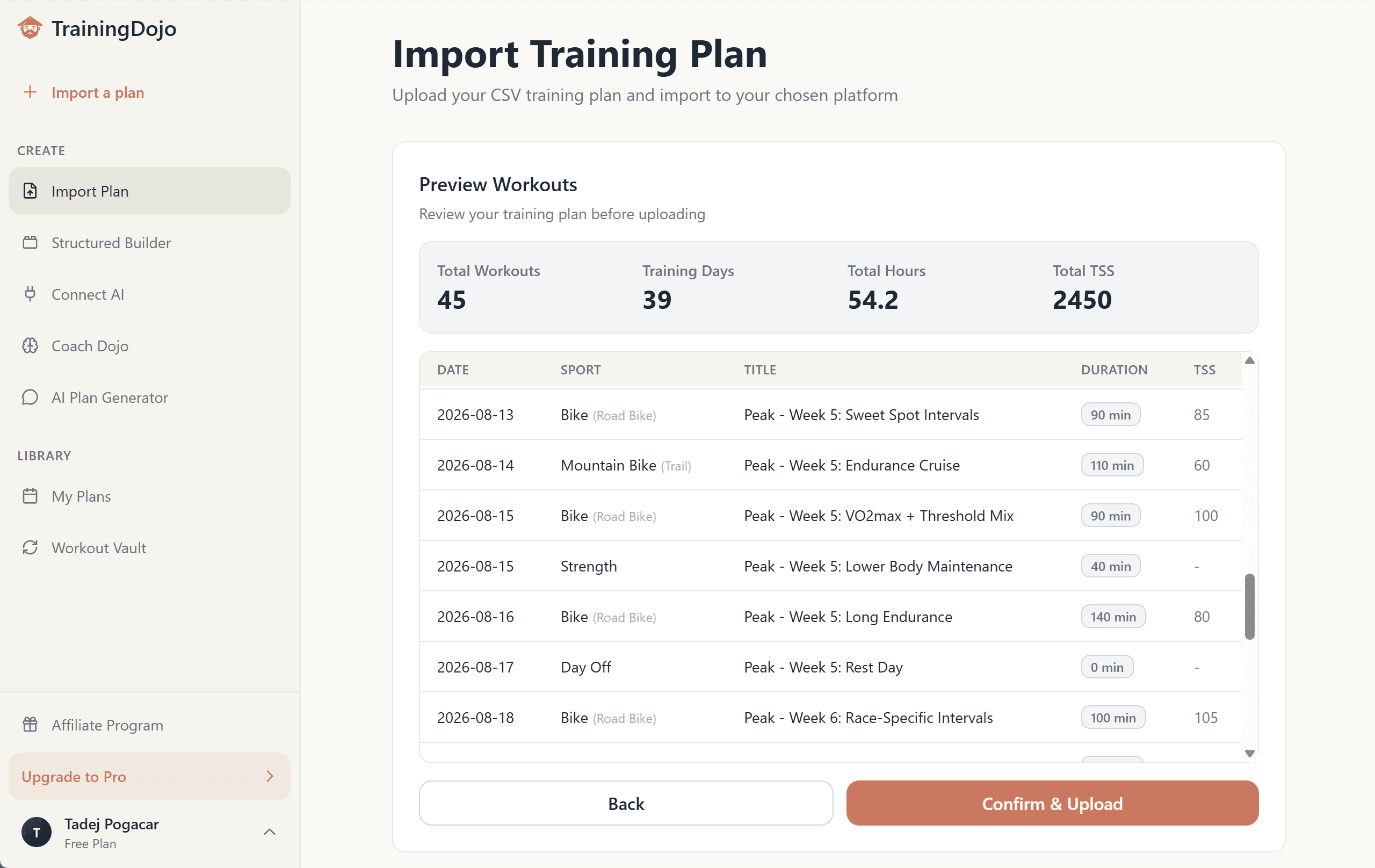
Bring a CSV from an AI, coach, or spreadsheet. Choose the start date and preview every workout before anything moves.
From plan to workout
Start with a plan from an AI, coach, or spreadsheet—or build a custom one here. Preview every date, then publish to TrainingPeaks, Intervals.icu, or your calendar without rebuilding by hand.
Works with what you already use
 ChatGPT
 Claude
 Gemini
 Strava
 TrainingDojo
 TrainingPeaks
 Intervals.icu
 Zwift
Zwift Google Calendar
Bring a plan from an AI, coach, or spreadsheet — or build one here with Coach Dojo, AI Plan Chat, or your own AI through the MCP.
Plans in. Workouts out.
 ChatGPT
 Claude
 Gemini
 Perplexity
 Microsoft Excel
 Strava
 Apple Calendar
 Intervals.icuZwift
 TrainingPeaksGoogle Calendar
 Outlook Calendar
 Garmin
 Wahoo
WahooBring training context in, then publish workouts to the platforms and calendars already in your routine.
How it works
Bring a CSV from an AI, coach, or spreadsheet. Choose the start date and preview every workout before anything moves.
Keep simple calendar workouts as text, or turn key sessions into editable intervals with targets, IF, TSS, and a workout preview.
Upload to TrainingPeaks or Intervals.icu, export Zwift-ready files, or download one calendar file for Google, Apple, or Outlook.
Connected AI · Pro
Connect Claude, ChatGPT, or Gemini to your TrainingPeaks, Strava, or Intervals.icu data. It can read history and wellness, build structured workouts and plans, and—when you ask—update upcoming workouts.
A real review flow
Model Context Protocol (MCP) is the connection layer. It is user-triggered: TrainingDojo does not continuously monitor or automatically change your plan.
Connect your AIWhat’s my workout today?
Show me how it fits this week.
I’ll confirm your connected platform, then pull the next few workouts so today has context.
Checking connected platforms
TrainingPeaks connectedReading this week’s calendar
6 workouts foundget_connected_platformsget_upcoming_workoutsToday · Bike · 92 minutes
Read-only · no changes made
What’s my workout today?
Show me how it fits this week.
Coach Dojo
Analyze recent TrainingPeaks, Strava, or Intervals.icu history, answer the questions your data cannot, and generate a plan around your goal and constraints.
Build from your history →Workout Vault
Mine TrainingPeaks or Intervals.icu history, copy a past plan, or turn repeatable sessions into structured templates instead of starting over.
Open Workout Vault →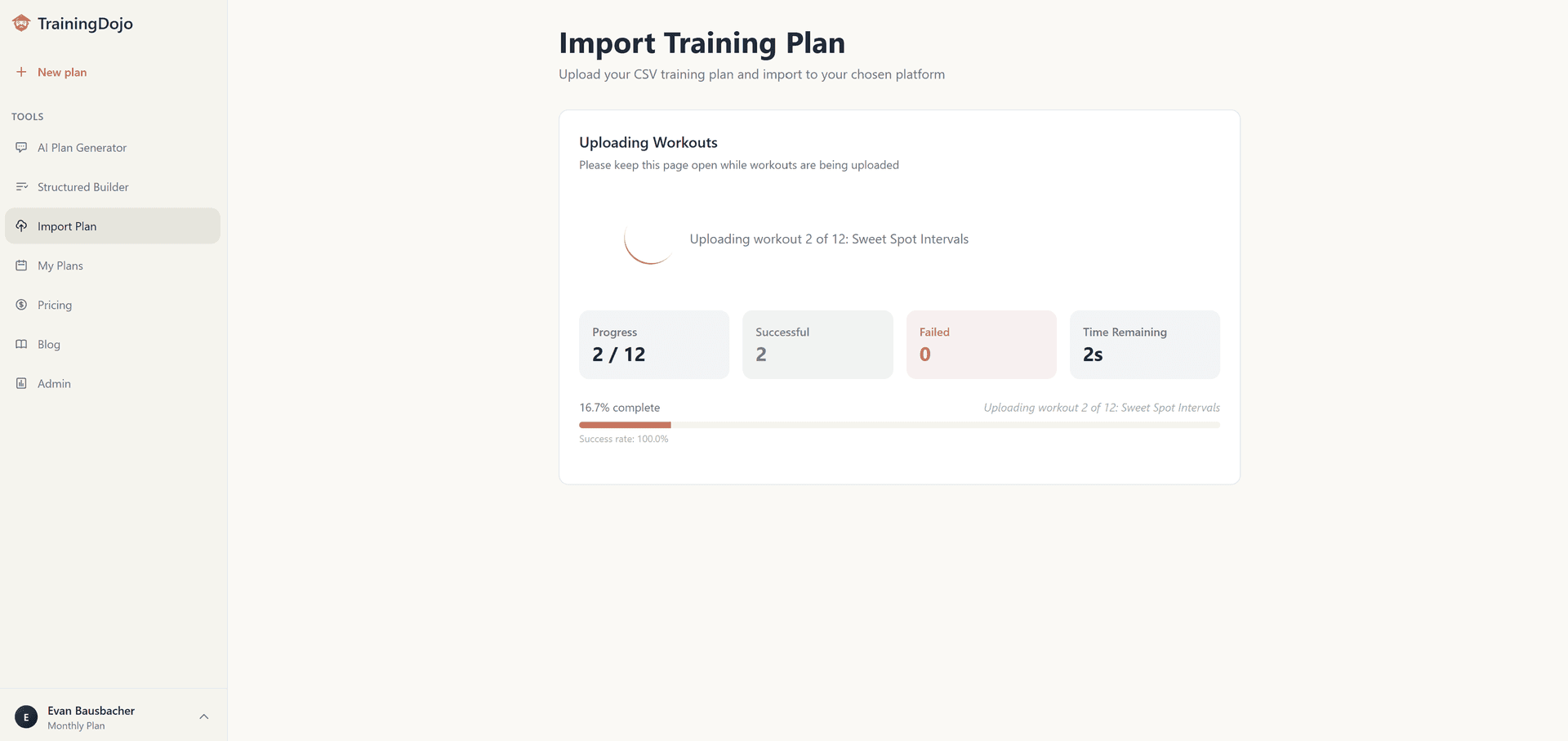
See every upload result and keep successful workouts even when one row needs attention.
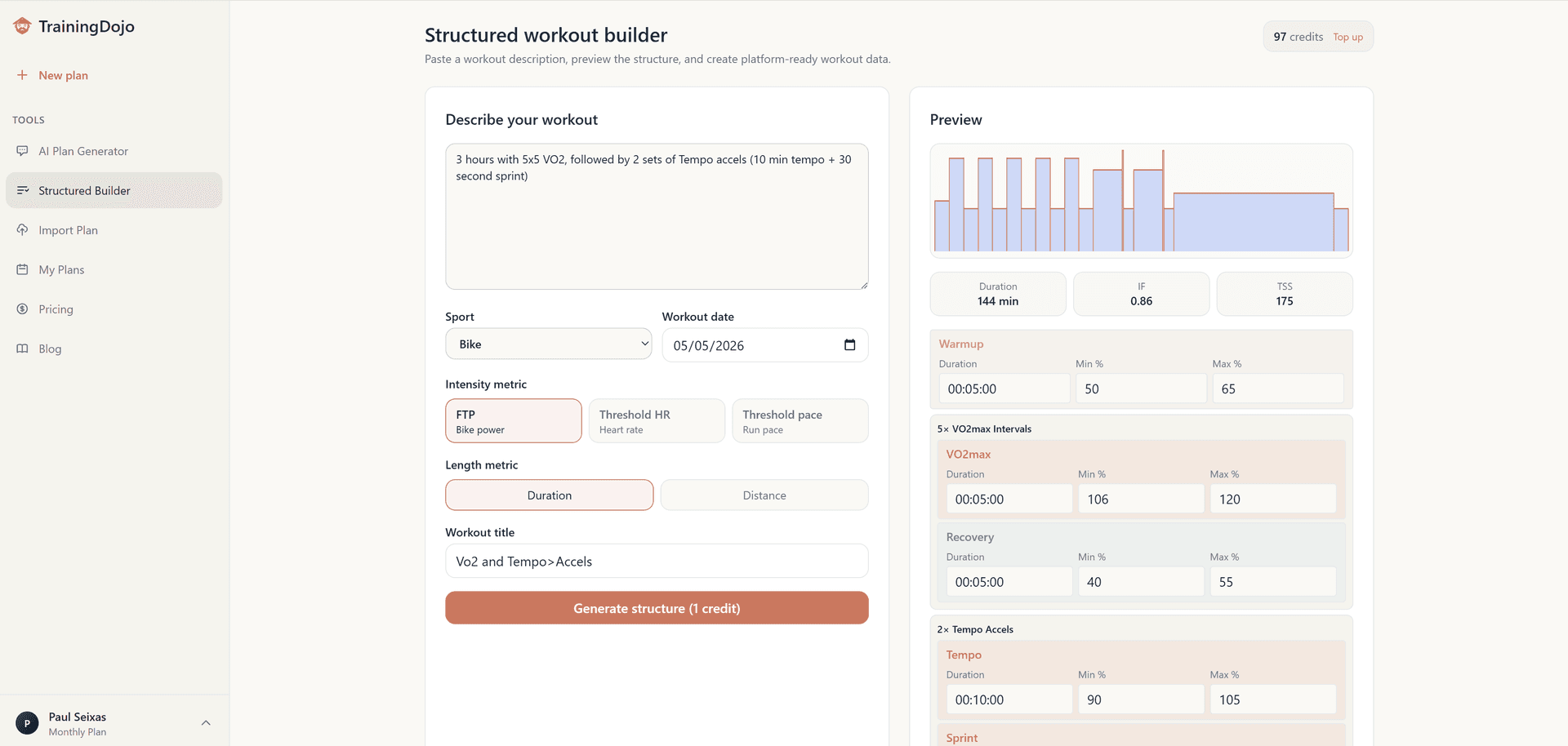
Edit the blocks and targets before the workout reaches your training platform.
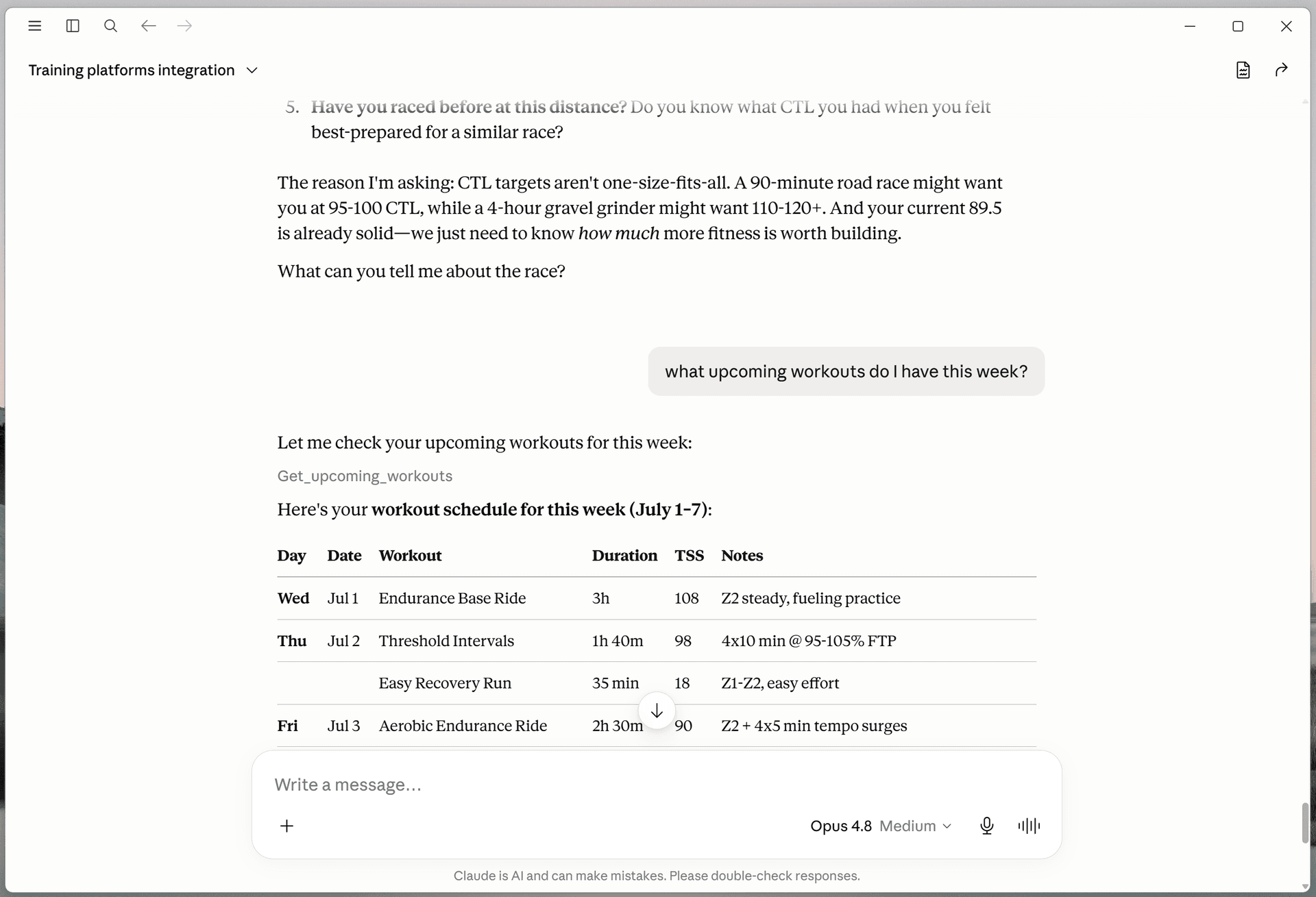
Your chosen AI can read permitted training context, show the proposed change, and update workouts when you approve the action.


Founder story
I'm Evan Bausbacher, a USA National Champion and two-time Elite Texas State Road Race Champion. I built TrainingDojo after using coaches, spreadsheets, and AI in my own training and repeatedly running into the same two problems.
Producing a plan that respects the athlete's history, goal, schedule, and recovery takes more than a generic prompt. Then, even a good plan loses value when every date and interval has to be rebuilt in a training platform by hand.
TrainingDojo handles both sides: build from real context when you need a plan, then preview, structure, and publish the workouts into the tools you actually train with.


FAQ
TrainingDojo turns plans from AI, coaches, and spreadsheets into dated workouts you can preview and publish. It also converts plain-language workout descriptions into editable structured intervals, so you do not have to rebuild every workout by hand.
Often, yes. AI is good at structuring progressions, rebuilding a week around missed sessions, and turning intent into specific intervals, and for many athletes it replaces a coach outright at roughly 90% less than typical coaching costs. What it needs is context. Coach Dojo and connected AI build from your real TrainingPeaks, Strava, or Intervals.icu history instead of a blank prompt, and can adjust your plan as needed.
TrainingDojo uploads plans directly to TrainingPeaks and Intervals.icu. It can also export one .ics file for Google Calendar, Apple Calendar, or Outlook. Compatible structured bike and run workouts can be exported as Zwift .zwo files.
TrainingDojo does not currently connect directly to Garmin or Wahoo. Publish the workout to TrainingPeaks or Intervals.icu first, then use the device sync supported by that platform and your device account. This integration is currently in development.
A structured workout contains timed steps, repetitions, recoveries, and power, pace, or heart-rate targets. TrainingDojo lets you review and edit those blocks before pushing them to TrainingPeaks or Intervals.icu or exporting a compatible Zwift file.
The Free plan includes: CSV plan import to TrainingPeaks and Intervals.icu; Calendar export for Google Calendar, Apple Calendar, and Outlook; Zwift .zwo export for compatible structured workouts; Distance and duration workout rows; 5 structured workout credits; Mine workouts and copy plans in Workout Vault. Pro includes: Unlimited TrainingPeaks and Intervals.icu imports; Plain-text and bulk CSV structured workout conversion; 100 structured workout credits every month; TrainingDojo MCP for Claude, ChatGPT, Codex, Work mode, and eligible Gemini accounts; Coach Dojo training plans built from workout history; Workout Vault generation and reusable structured workout templates.
Yes. TrainingDojo Pro can connect supported Claude, ChatGPT, Codex, Work mode, and eligible Gemini clients through browser authorization. This uses Model Context Protocol, or MCP, after you choose to connect it.
Your AI can read permitted training history, upcoming workouts, wellness data, and connected-platform status; build and validate structured workouts and plans; and publish supported changes. Ask it to review and adjust the week when you want a change. TrainingDojo does not continuously monitor or autonomously change your plan.
Coach Dojo reads recent history from a connected TrainingPeaks, Strava, or Intervals.icu account, summarizes the training you have actually done, asks about goals and constraints, and creates a plan from that context. Strava is a read-only history source.
TrainingDojo uses encrypted saved connections when you opt in and limits platform access to the capability each integration supports. Manual credentials remain client-side. Connected AI tool requests include only the authenticated inputs and results needed for that action, not the rest of your AI-provider conversation.
TrainingDojo Pro is $20 monthly or $15/month billed annually. You can cancel at any time and keep access through the end of the current billing period.
From plan to workout, without the rebuild.
Preview the dates and publish your first plan to the tools you already use.
Import a plan free